Undo tab
Sometimes you need to undo a replacement you have made. On the Undo tab, you can find the replacement, view its parameters, and press the Undo button. The replacements are sorted by date from newest to oldest.
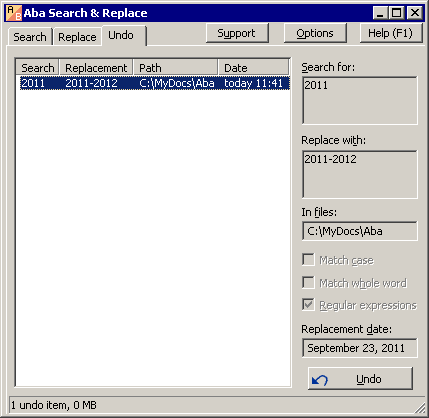
Aba makes a backup of your files when you replace a text in them. The backups take some space on your hard drive (shown in the status bar on the Undo tab). They are stored in the same directory as the ini file.
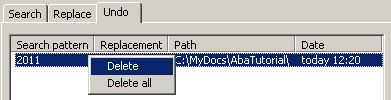
The oldest undo items are deleted if the size of all items reaches the limit specified in Options. You can manually delete a backup (for example, for privacy reasons) by right-clicking it and choosing Delete from the context menu. There is also an option to delete all backups.
This is a page from Aba Search and Replace help file.
- Welcome to Aba
- Getting started
- How-to guides
- Selecting the files to search in
- Inserting some text at the beginning of each file
- Replacing multiple lines of text
- Searching in Unicode files
- Replacing in binary files
- Performing operations with the found files
- Undoing a replacement
- Saving search parameters for further use
- Removing private data
- Adding or removing Aba from Explorer context menu
- Integrating Aba with Total Commander
- Integrating Aba with Free Commander
- Integrating Aba with Directory Opus
- Regular Expressions
- Replacement syntax
- User interface
- Command line
- Troubleshooting
- Glossary
- Version history
- Credits