Performing operations with the found files
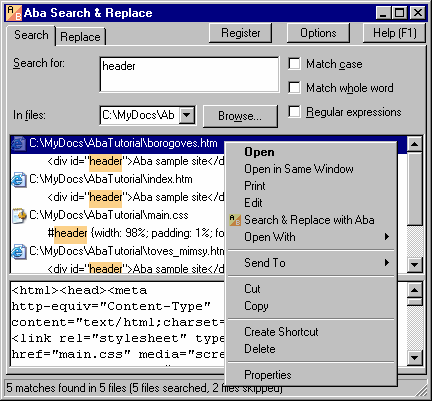
Enter the text you want to search for. When the found files appear in the results pane, you can:
- switch to the Search tab and click a file to view its contents in the context viewer;
- double-click a file to open it in an external program;
- right-click a file to open it in another program, to copy or to cut it, to send it to your USB flash drive, or to delete it;
- press Alt+Enter to view file properties;
- press F3 to launch an external viewer (you can choose one in the Options dialog);
- press F4 to launch an external editor.
After pressing the Replace button, you can do the same operations with modified files.
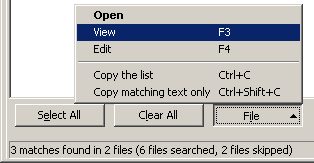
You also can use Open, View, and Edit commands in the File menu at the bottom of the Replace tab.
This is a page from Aba Search and Replace help file.
- Welcome to Aba
- Getting started
- How-to guides
- Selecting the files to search in
- Inserting some text at the beginning of each file
- Replacing multiple lines of text
- Searching in Unicode files
- Replacing in binary files
- Performing operations with the found files
- Undoing a replacement
- Saving search parameters for further use
- Removing private data
- Adding or removing Aba from Explorer context menu
- Integrating Aba with Total Commander
- Integrating Aba with Free Commander
- Integrating Aba with Directory Opus
- Regular Expressions
- Replacement syntax
- User interface
- Command line
- Troubleshooting
- Glossary
- Version history
- Credits