Regular Expressions 101
28 Jan 2024
With regular expressions, you can describe the patterns that are similar to each other. For example, you have multiple <img> tags, and you want to move all these images to the images folder:
<img src="9.png">   →  <img src="images/9.png">
<img src="10.png">  →  <img src="images/10.png">
and so on
You can easily write a regular expression that matches all file names that are numbers, then replace all such tags at once.
Basic syntax
If you need to match one of the alternatives, use an alternation (vertical bar). For example:
| Regex | Meaning |
a|img|h1|h2 | either a, or img, or h1, or h2 |
When using alternation, you often need to group characters together; you can do this with parentheses. For example, if you want to match an HTML tag, this approach won't work:
| Regex | Meaning |
<h1|h2|b|i> | <h1 or h2 (without the angle brackets) or b or i> |
because < applies to the first alternative only and > applies to the last one only. To apply the angle brackets to all alternatives, you need to group the alternatives together:
<(h1|h2|b|i)>
The last primitive (star) allows you to repeat anything zero or more times. You can apply it to one character, for example:
| Regex | Meaning |
a* | an empty string, a, aa, aaa, aaaa, etc. |
You also can apply it to multiple characters in parentheses:
| Regex | Meaning |
(ab)* | an empty string, ab, abab, ababab, abababab, etc. |
Note that if you remove the parentheses, the star will apply to the last character only:
| Regex | Meaning |
ab* | an empty string, ab, abb, abbb, abbbb, etc. |

Author: Konrad Jacobs. Source: Archives of the Mathematisches Forschungsinstitut Oberwolfach.
The star is named Kleene star after an American mathematician Stephen Kleene who invented regular expressions in the 1950s. It can match an empty string as well as any number of repetitions.
These three primitives (alternation, parentheses, and the star for repetition) are enough to write any regular expression, but the syntax may be verbose. For example, you now can write a regex for matching the file names that are numbers in an <img> tag:
| Regex | Meaning |
(0|1|2|3|4|5|6|7|8|9)(0|1|2|3|4|5|6|7|8|9)* | one or more digits |
(1|2|3|4|5|6|7|8|9)(0|1|2|3|4|5|6|7|8|9)* | a positive integer number (don't allow zero as the first character) |
The parentheses may be nested without a limit, for example:
| Regex | Meaning |
(1|2|3|4|5|6|7|8|9)(0|1|2|3|4|5|6|7|8|9)*(,(1|2|3|4|5|6|7|8|9)(0|1|2|3|4|5|6|7|8|9)*)* | one or more positive integer numbers, separated with commas |
Convenient shortcuts for character classes
You can write any regex with the three primitives, but it quickly becomes hard to read, so a few shortcuts were invented. When you need to match any of the listed characters, please put them into square brackets:
| Regex | Shorter regex | Meaning |
a|e|i|o|u|y | [aeiouy] | a vowel |
0|1|2|3|4|5|6|7|8|9 | [0123456789] | a digit |
0|1|2|3|4|5|6|7|8|9 | [0-9] | a digit |
a|b|c|d|e|f|g|h|i|j|k|l|m|n|o|p|q|r|s|t|u|v|w|x|y|z | [a-z] | a letter |
As you can see, it's possible to specify only the first and the last allowed character if you put a dash between them. There may be several such ranges inside square brackets:
| Regex | Meaning |
[a-z0-9] | a letter or a digit |
[a-z0-9_] | a letter, a digit, or the underscore character |
[a-f0-9] | a hexadecimal digit |
There are some predefined character classes that are even shorter to write:
| Regex | Meaning |
\s | a space character: the space, the tab character, the new line, or the carriage feed |
\d | a digit |
\w | a word character (a letter, a digits, or the underscore character) |
. | any character |
In Aba Search and Replace, these character classes include Unicode characters such as accented letters or Unicode line breaks. In other regex dialects, they usually include ASCII characters only, so \d is typically the same as [0-9] and \w is the same as [a-zA-Z0-9_].
The character classes don't add any new capabilities to the regular expressions; you can just list all allowed characters with an alternation, but a character class is much shorter to write. We now can write a shorter version of the regex mentioned before:
| Regex | Meaning |
[1-9][0-9]*(,[1-9][0-9])* | one or more positive integer numbers, separated with commas |
Repetitions
A Kleene star means "repeating zero or more times", but you often need another number of repetitions. As shown before, you can just copy-and-paste a regex to repeat it twice or three times, but there is a shorter notation for that:
| Regex | Shorter regex | Meaning |
\d\d* | \d+ | one or more digits |
(0|1)(0|1)* | [01]+ | any binary number (consisting of zeros and ones) |
(\s|) | \s? | either a space character or nothing |
http(s|) | https? | either http or https |
(-|\+|) | [-+]? | the minus sign, the plus sign, or nothing |
[a-z][a-z] | [a-z]{2} | two small letters |
[a-z][a-z]((([a-z]|)[a-z]|)[a-z]|) | [a-z]{2,5} | from two to five small letters |
[a-z][a-z][a-z]* | [a-z]{2,} | two or more small letters |
So there are the following repetition operators:
- a Kleene star
*means repeating zero or more times, so it can never match, it can match once, twice, three times, etc.; - a plus sign
+means repeating one or more times, so it must match at least once; - an optional part
?means zero times or once; - curly brackets
{m,n}means repeating from m to n times.
Note that you can express any repetition with the curly brackets, so these operators partially duplicate each other. For example:
| Regex | Shorter regex | Meaning |
\d{0,} | \d* | nothing or some digits |
\d{1,} | \d+ | one or more digits |
\s{0,1} | \s? | either a space character or nothing |
Just like the Kleene star, the other repetition operators can apply to parentheses, so you can nest them indefinitely.
Escaping
If you need to match any of the special characters like parentheses, vertical bar, plus, or star, you must escape them by adding a backslash \ before them. For example, to find a number in parentheses, use \(\d+\).
A common mistake is to forget a backslash before a dot. Note that a dot means any character, so if you write example.com in a regular expression, it will match examplexcom or something similar, which may even cause a security issue in your program. Now we can write a regex to match the <img> tags:
<img src="\d+\.png">
This matches any filename consisting of digits and we correctly escaped the dot.
Other features
Modern regex engines add more features such as backreferences or conditional subpatterns. Mathematically speaking, these features don't belong to the regular expressions; they describe a non-regular language, so you cannot replace them with the three primitives.
Next time, we will discuss anchors and zero-width assertions.
Regular expression for numbers
30 Dec 2023
It's easy to find a positive integer number with regular expressions:
[0-9]+
This regex means digits from 0 to 9, repeated one or more times. However, numbers starting with zero are treated as octal in many programming languages, so you may wish to avoid matching them:
[1-9][0-9]*
This regular expression matches any positive integer number starting with a non-zero digit. If you also need to match zero, you can include it as another branch:
[1-9][0-9]*|0
To also accomodate negative integer numbers, you can allow a minus sign before the digits:
-?[1-9][0-9]*|0
Sometimes it's necessary to allow a plus sign as well:
[-+]?[1-9][0-9]*|0
The previous regexes searched the input string for a number. If you need to match a number only discarding anything else, you can add the ^ anchor to match the beginning of the string and the $ anchor to match the end:
^(-?[1-9][0-9]*|0)$
Parentheses are necessary here; without them, the ^ anchor would apply only to the first branch. Another variation of the same regex avoids finding numbers that are part of words, such as 600px or x64:
\b(-?[1-9][0-9]*|0)\b
Things get more complicated if you need to match a fractional number:
\b-?(?:[1-9][0-9]*(?:\.[0-9]+)?|\.[0-9]+|0)\b
Let's break down this regular expression:
- The first branch
[1-9][0-9]*(?:\.[0-9]+)?matches an integer number starting with a non-zero digit, then an optional fractional part. - The second branch
\.[0-9]+matches fractional numbers starting with a dot, for example,.5is another way to write0.5. - The third branch matches zero. Note that both positive and negative zeros are possible in floating-point numbers.
For floating-point numbers with an exponent, such as 5.2777e+231, please use:
\b-?(?:[1-9][0-9]*(?:\.[0-9]+)?|\.[0-9]+|0)(?:[eE][+-]?[0-9]+)?\b
Many programming languages support hexadecimal numbers starting with 0x. Here is a regular expression to match them:
0x[0-9a-fA-F]+
Finally, here is a comprehensive regular expression to match floating-point, integer decimal, or hexadecimal numbers:
\b-?(?:[1-9][0-9]*(?:\.[0-9]+)?|\.[0-9]+|0(?:x[0-9a-fA-F]+)?)(?:[eE][+-]?[0-9]+)?\b
Aba 2.6 released
25 Dec 2023
This version adds the following features:
- complex replacements including converting the matching text to lowercase, inserting the file name, or adding width/height attributes to <img> tags (now you can use a simple scripting language in the replacements);
- a 64-bit version (if needed, you still can choose a 32-bit version during installation);
- a new hotkey: the left/right arrow key to quickly jump to the next/previous file (when the results pane is focused);
- the taskbar button now flashes when a long operation is complete;
- basic support for emojis (ZWJ sequences and skin tones are displayed as separate characters).
Just as always, the upgrade is free for the registered users; your settings and search history will be preserved when you run the installer.
If you have any suggestions for new features, please contact me. I will be happy to implement your ideas.
Search from the Windows command prompt
21 May 2023
When you need to search within text files from Windows batch files, you can use either the find or findstr command. Findstr supports a limited version of regular expressions. You can also automate certain tasks based on the search results.
The find command
To search for text in multiple files from the Windows command prompt or batch files, you can use the FIND command, which has been present since the days of MS DOS and is still available in Windows 11. It's similar to the Unix grep command, but does not support regular expressions. If you want to search for the word borogoves in the current directory, please follow this syntax:
find "borogoves" *
Note that the double quotes around the pattern are mandatory. If you are using PowerShell, you will need to include single quotes as well:
find '"borogoves"' *
Instead of the asterisk (*), you can specify a file mask such as *.htm?. The find command displays the names of the files it scans, even if it doesn't find any matches within these files:
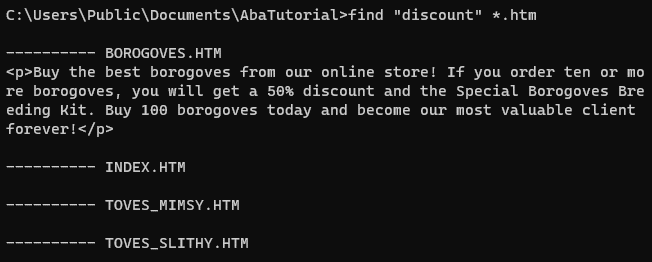
The search is case-sensitive by default, so you typically need to add the /I switch to treat uppercase and lowercase letters as equivalent:
find /I "<a href=" *.htm
If you don't specify the file to search in, find will wait for the text input from stdin, so that you can pipe output from another command. For example, you can list all copy commands supported in Windows:
help | find /i "copy"
Another switch, /V, allows you to find all lines not containing the pattern, similar to the grep -v command.
In batch files, you can use the fact that the find command sets the exit code (errorlevel) to 1 if the pattern is not found. For instance, you can check if the machine is running a 64-bit or 32-bit version of Windows:
@echo off

rem Based on KB556009 with some corrections
reg Query "HKLM\Hardware\Description\System\CentralProcessor\0" /v "Identifier" | find /i "x86 Family" > nul
if errorlevel 1 goto win64

echo 32-bit Windows
goto :eof

:win64
rem Could be AMD64 or ARM64
echo 64-bit Windows
The findstr command: regular expression search
If you need to find a regular expression, try the FINDSTR command, which was introduced in Windows XP. For historical reasons, findstr supports a limited subset of regular expressions, so you can only use these regex features:
- The dot
.matches any character except for newline and extended ASCII characters. - Character lists
[abc]match any of the specified characters (a,b, orc). - Character list ranges
[a-z]match any letter fromatoz. - The asterisk (
*) indicates that the previous character cane be repeated zero or more times. - The
\<and\>symbols mark the beginning and the end of a word. - The caret (
^) and the dollar sign ($) denote the beginning of and the end of a line. - The backslash (
\) escapes any metacharacter, allowing you to find literal characters. For example,\$finds the dollar sign itself.
Findstr does not support character classes (\d), alternation (|), or other repetitions (+ or {5}).
The basic syntax is the same as for the FIND command:
findstr "\<20[0-9][0-9]\>" *.htm
This command finds all years starting with 2000 in the .htm files of the current directory. Just like with find, use the /I switch for a case-insensitive search:

Findstr limitations and quirks
Character lists [a-z] are always case-insensitive, so echo ABC | findstr "[a-z]" matches.
The space character works as the alternation metacharacter in findstr, so a search query like findstr "new shoes" * will find all lines containing either new or shoes. Unfortunately, there is no way to escape the space and use it as a literal character in a regular expression. For example, you cannot find lines starting with a space.
Syntax errors in regular expression are ignored. For instance, findstr "[" * will match all lines that contain the [ character.
If the file contains Unix line breaks (LF), the $ metacharacter does not work correctly. If the last line of a file lacks a line terminator, findstr will be unable to find it. For example, findstr "</html>$" * won't work if there is no CR+LF after </html>.
Early Windows versions had limitations on line length for find and findstr, as well as other commands. The recent versions lifted these limits, so you don't have to worry about them anymore. See this StackOverflow question for findstr limitations and bugs, especially in early Windows versions.
The findstr command operates in the OEM (MS DOS) code page; the dot metacharacter does not match any of the extended ASCII characters. As the result, the command is not very useful for non-English text. Besides that, you cannot search for Unicode characters (UTF-8 or UTF-16).
Conclusion
You can learn about other switches by typing findstr /? or find /?. For example, the additional switches allow you to search in subdirectories or print line numbers. You can also refer to the official documentation.
In general, the find and findstr commands are outdated and come with various quirks and limitations. Shameless plug: Aba Search and Replace supports command-line options as well, allowing you to search from the command prompt and replace text from Windows batch files.
Empty character class in JavaScript regexes
10 Apr 2023
I contributed to PCRE and wrote two smaller regular expression engines, but I still regularly learn something new about this topic. This time, it's about a regex that never matches.
When using character classes, you can specify the allowed characters in brackets, such as [a-z] or [aeiouy]. But what happens if the character class is empty?
Popular regex engines treat the empty brackets [] differently. In JavaScript, they never match. This is a valid JavaScript code, and it always prints false regardless of the value of str:
const str = 'a';
console.log(/[]/.test(str));
However, in Java, PHP (PCRE), Go, and Python, the same regex throws an exception:
// Java
@Test
void testRegex1() {
    PatternSyntaxException e = assertThrows(PatternSyntaxException.class,
        () -> Pattern.compile("[]"));
    assertEquals("Unclosed character class", e.getDescription());
}
<?php
ini_set('display_errors', 1);
error_reporting(E_ALL);

// Emits a warning: preg_match(): Compilation failed: missing terminating ] for character class
echo preg_match('/[]/', ']') ? 'Match ' : 'No match';
# Python
import re
re.compile('[]') # throws "unterminated character set"
In these languages, you can put the closing bracket right after the opening bracket to avoid escaping the former:
// Java
@Test
void testRegex2() {
    Pattern p = Pattern.compile("[]]");
    Matcher m = p.matcher("]");
    assertTrue(m.matches());
}
<?php
echo preg_match('/[]]/', ']', $m) ? 'Match ' : 'No match'; // Outputs 'Match'
print_r($m);
# Python
import re
print(re.match('[]]', ']')) # outputs the Match object
// Go
package main

import (
    "fmt"
    "regexp"
)

func main() {
    matched, err := regexp.MatchString(`[]]`, "]")
    fmt.Println(matched, err)
}
This won't work in JavaScript because the first ] is interpreted as the end of the character class there, so the same regular expression in JavaScript means an empty character class that never matches, followed by a closing bracket. As the result, the regular expression never finds the closing bracket:
// JavaScript
console.log(/[]]/.test(']')); // outputs false
If you negate the empty character class with ^ in JavaScript, it will match any character including newlines:
console.log(/[^]/.test('')); // outputs false
console.log(/[^]/.test('a')); // outputs true
console.log(/[^]/.test('\n')); // outputs true
Again, this is an invalid regex in other languages. PCRE can emulate the JavaScript behavior if you pass the PCRE2_ALLOW_EMPTY_CLASS option to pcre_compile. PHP never passes this flag.
If you want to match an opening or a closing bracket, this somewhat cryptic regular expression will help you in Java, PHP, Python, or Go: [][]. The first opening bracket starts the character class, which includes the literal closing bracket and the literal opening bracket, and finally, the last closing bracket ends the class.
In JavaScript, you need to escape the closing bracket like this: [\][]
console.log(/[\][]/.test('[')); // outputs true
console.log(/[\][]/.test(']')); // outputs true
In Aba Search and Replace, I chose to support the syntax used in Java/PHP/Python/Go. There are many other ways to construct a regular expression that always fails, in case you need it. So it makes sense to use this syntax for a literal closing bracket.
Privacy Policy Update - December 2022
25 Dec 2022
Updated our privacy policy:
- clarified your rights under GDPR (you can object to processing of your personal data or restrict the processing, etc.);
- added that we don't do any profiling for marketing purposes, but PayPro Global may do risk scoring in order to prevent a potential credit card fraud;
- added that we can notify you by email about new software versions (you can leave this checkbox empty or unsubscribe at any time);
- listed what happens if you don't provide your personal data (e.g., if you don't provide your email address, we cannot reply to you);
- changed the refund policy from 30 to 14 days, added a reference to the relevant Czech law;
- stated that we do full-disk encryption and encrypt all backups, so your personal data are safe with us.
Note that we are required by law to notify you of any changes in the privacy policy. Thank you and have a nice holiday season!
Aba 2.5 released
11 Dec 2022
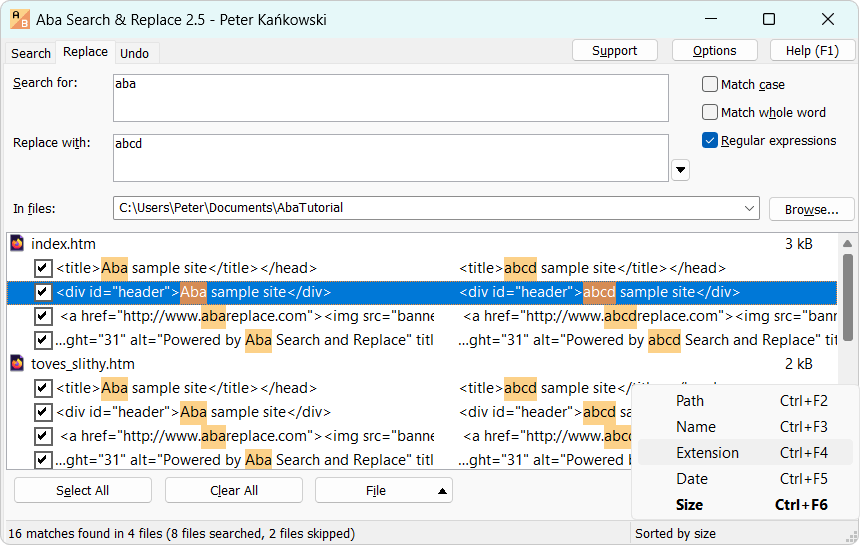
The new features in this version include:
- Search and replace from the command line
- Skip subdirectories when searching (click the Browse button and uncheck Include subdirectories)
- Sorting the search results by path, filename, extension, modification date, or file size.
- Escape sequences and character classes inside the character lists, e.g.
[\d\s]to find a digit, a space, or a newline. - Fixed multiple bugs including encoding detection in very short files and searching for the replacement character U+FFFD (many thanks to Joe). Also fixed incorrect search in files slightly larger than 4 GB.
- Now relative paths are displayed instead of absolute ones in the search results.
The upgrade is free for the registered users. Just download the installer and run it; your settings and search history will be preserved.
Our response to the war in Ukraine
1 Oct 2022
In response to the Russian invasion of Ukraine, I blocked all orders from Russia starting from March 2022. I fully support Ukraine in this terrible war and donate money to help Ukrainian refugees in Czech Republic.
Many of you are in a tough situation now due to the high inflation and the rising energy prices. So I introduce a 10% discount for all new Aba Search and Replace users, but especially for freelancers and small businesses who pay for the software from their own pocket.
Please use this coupon code at checkout:
GloryToUkraine
The coupon code is valid until the end of 2022. I plan to release a new version within several weeks; the upgrade will be free for all registered users. Please stay tuned.
Thank you for your continuous support. Wishing you peace and good fortune.
Peter Kankowski,
Aba Search and Replace developer
Check VAT ID with regular expressions and VIES
31 Jul 2022
In the European Union, each business registered for VAT has an unique identification number like IE9825613N or LU20260743. When selling to EU companies, you need to ask for their VAT ID, validate it, and include it into the invoice. The tax rate depends on the place of taxation and the client type (a person or a company). Some customers may provide a wrong VAT ID — either by mistake or in an attempt to avoid paying the tax. So it's important to check the VAT number.
EU provides the VIES page (VAT Information Exchange System) and a free SOAP API for the VAT ID validation. Here is how you can query the API:
Linux / macOS:

curl -d '<soapenv:Envelope xmlns:soapenv="http://schemas.xmlsoap.org/soap/envelope/" xmlns:urn="urn:ec.europa.eu:taxud:vies:services:checkVat:types"><soapenv:Body><urn:checkVat><urn:countryCode>IE</urn:countryCode><urn:vatNumber>9825613N</urn:vatNumber></urn:checkVat></soapenv:Body></soapenv:Envelope>' 'https://ec.europa.eu/taxation_customs/vies/services/checkVatService'

Windows:

(iwr 'https://ec.europa.eu/taxation_customs/vies/services/checkVatService' -method post -body '<soapenv:Envelope xmlns:soapenv="http://schemas.xmlsoap.org/soap/envelope/" xmlns:urn="urn:ec.europa.eu:taxud:vies:services:checkVat:types"><soapenv:Body><urn:checkVat><urn:countryCode>IE</urn:countryCode><urn:vatNumber>9825613N</urn:vatNumber></urn:checkVat></soapenv:Body></soapenv:Envelope>').content
If the VAT number is invalid, you will get <valid>false</valid> in the response. You can use a SOAP library or just concatenate the XML string with the VAT identification number. In the latter case, you should quickly check the VAT number with a regular expression, otherwise an attacker can include an arbitrary XML code into it. The VIES WSDL file provides these regular expressions:
Country code: [A-Z]{2}
VAT ID without the country code: [0-9A-Za-z\+\*\.]{2,12}
The country code consists of two capital letters; the VAT ID itself is from 2 to 12 letters, digits, or these characters: + * .
So the finished code for VAT ID validation could look like this:
import re, urllib.request, xml.etree.ElementTree as XmlElementTree

# Return a dictionary with some information about the company, or False if the vat_id is invalid
def check_vat_id(vat_id):
  m = re.match('^([A-Z]{2})([0-9A-Za-z\+\*\.]{2,12})$', vat_id.replace(' ', ''))
  if not m:
    return False

  data = '<soapenv:Envelope xmlns:soapenv="http://schemas.xmlsoap.org/soap/envelope/" ' + \
         'xmlns:urn="urn:ec.europa.eu:taxud:vies:services:checkVat:types">' + \
         '<soapenv:Body><urn:checkVat><urn:countryCode>' + m.group(1) + '</urn:countryCode>' + \
         '<urn:vatNumber>' + m.group(2) + '</urn:vatNumber></urn:checkVat></soapenv:Body></soapenv:Envelope>'

  with urllib.request.urlopen('https://ec.europa.eu/taxation_customs/vies/services/checkVatService', data.encode('ascii')) as response:
    resp = response.read().decode('utf-8')

    ns = {
       'soap': 'http://schemas.xmlsoap.org/soap/envelope/',
       'checkVat': 'urn:ec.europa.eu:taxud:vies:services:checkVat:types',
    }

    checkVatResponse = XmlElementTree.fromstring(resp).find('./soap:Body/checkVat:checkVatResponse', ns)
    if checkVatResponse.find('./checkVat:valid', ns).text != 'true':
       return False

    res = {}
    for child in checkVatResponse:
       res[child.tag.replace('{urn:ec.europa.eu:taxud:vies:services:checkVat:types}', '')] = child.text
    return res


print(check_vat_id('IE9825613N'))
Each EU country also has its own rules for a VAT identification number, so you can do a stricter pre-check with a complex regular expression, but VIES already covers this for you. Also note that some payment processors (e.g. Stripe) already do a VIES query under the hood.
Which special characters must be escaped in regular expressions?
8 Jan 2022
In most regular expression engines (PCRE, JavaScript, Python, Go, and Java), these special characters must be escaped outside of character classes:
[ * + ? { . ( ) ^ $ | \
If you want to find one of these metacharacters literally, please add \ before it. For example, to find the text $100, use \$100. If you want to find the backslash itself, double it: \\.
Inside character classes [square brackets], you must escape the following characters:
\ ] -
For example, to find an opening or a closing bracket, use [[\]].
If you need to include the dash into a character class, you can make it the first or the last character instead of escaping it. Use [a-z-] or [a-z\-] to find a Latin letter or a dash.
If you need to include the caret ^ into a character class, it cannot be the first character; otherwise, it will be interpreted as any character except the specified ones. For example: [^aeiouy] means "any character except vowels", while [a^eiouy] means "any vowel or a caret". Alternatively, you can escape the caret: [\^aeiouy]
JavaScript
In JavaScript, you also need to escape the slash / in regular expression literals:
/AC\/DC/.test('AC/DC')
Lone closing brackets ] and } are allowed by default, but if you use the 'u' flag, then you must escape them:
/]}/.test(']}') // true
/]}/u.test(']}') // throws an exception
This feature is specific for JavaScript; lone closing brackets are allowed in other languages.
If you create a regular expression on the fly from a user-supplied string, you can use the following function to properly escape the special characters:
function escapeRe(str) {
    return str.replace(/[[\]*+?{}.()^$|\\-]/g, '\\$&');
}

var re = new RegExp(escapeRe(start) + '.*?' + escapeRe(end));
PHP
In PHP, you have the preg_quote function to insert a user-supplied string into a regular expression pattern. In addition to the characters listed above, it also escapes # (in 7.3.0 and higher), the null terminator, and the following characters: = ! < > : -, which do not have a special meaning in PCRE regular expressions but are sometimes used as delimiters. Closing brackets ] and } are escaped, too, which is unnecessary:
preg_match('/]}/', ']}'); // returns 1
Just like in JavaScript, you also need to escape the delimiter, which is usually /, but you can use another special character such as # or = if the slash appears inside your pattern:
if (preg_match('/\/posts\/([0-9]+)/', $path, $matches)) {
}

// Can be simplified to:
if (preg_match('#/posts/([0-9]+)#', $path, $matches)) {
}
Note that preg_quote does not escape the tilde ~ and the slash /, so you should not use them as delimiters if you construct regexes from strings.
In double quotes, \1 and $ are interpreted differently than in regular expressions, so the best practice is:
- to use single quotes with preg_match, preg_replace, etc.;
- to repeat backslash 4 times if you need to match a literal backslash. This is because you need to escape the backslash in the regular expression, but you also need to escape it in the single-quoted string. So it's escaped twice:
$text = 'C:\\Program files\\';
echo $text;
if (preg_match('/C:\\\\Program files\\\\/', $text, $matches)) {
   print_r($matches);
}
Python
Python has a raw string syntax (r''), which conveniently avoids the backslash escaping idiosyncrasies of PHP:
import re
re.match(r'C:\\Program files/Tools', 'C:\\Program files/Tools')
You only need to escape the quote in raw strings:
re.match(r'\'', "'")
re.match(r"'", "'") // or just use double quotes if you have a regex with a single quote

re.match(r"\"", '"')
re.match(r'"', '"') // or use single quotes if you have a regex with a double quote

re.match(r'"\'', '"\'') // multiple quote types; cannot avoid escaping them
A raw string literal cannot end with a single backslash, but this is not a problem for a valid regular expression.
To match a literal ] inside a character class, you can make it the first character: [][] matches a closing or an opening bracket. Aba Search & Replace supports this syntax, but other programming languages do not. You can also quote the ] character with a slash, which works in all languages: [\][] or [[\]].
For inserting a string into a regular expression, Python offers the re.escape method. Unlike JavaScript with the u flag, Python tolerates escaping non-special punctuation characters, so this function also escapes -, #, &, and ~:
print(re.escape(r'-#&~')) // prints \-\#\&\~
re.match(r'\@\~', '@~') // matches
Java
Java allows escaping non-special punctuation characters, too:
Assert.assertTrue(Pattern.matches("\\@\\}\\] }]", "@}] }]"));
Similarly to PHP, you need to repeat the backslash character 4 times, but in Java, you also must double the backslash character when escaping other characters:
Assert.assertTrue(Pattern.matches("C:\\\\Program files \\(x86\\)\\\\", "C:\\Program files (x86)\\"));
This is because the backslash must be escaped in a Java string literal, so if you want to pass \\ \[ to the regular expression engine, you need to double each backslash: "\\\\ \\[". There are no raw string literals in Java, so regular expressions are just usual strings.
There is the Pattern.quote method for inserting a string into a regular expression. It surrounds the string with \Q and \E, which escapes multiple characters in Java regexes (borrowed from Perl). If the string contains \E, it will be escaped with the backslash \:
Assert.assertEquals("\\Q()\\E",
      Pattern.quote("()"));

Assert.assertEquals("\\Q\\E\\\\E\\Q\\E",
      Pattern.quote("\\E"));

Assert.assertEquals("\\Q(\\E\\\\E\\Q)\\E",
      Pattern.quote("(\\E)"));
The \Q...\E syntax is another way to escape multiple special characters that you can use. Besides Java, it's supported in PHP/PCRE and Go regular expressions, but not in Python nor in JavaScript.
Go
Go raw string literals are characters between back quotes: `\(`. It's preferable to use them for regular expressions because you don't need to double-escape the backslash:
r := regexp.MustCompile(`\(text\)`)
fmt.Println(r.FindString("(text)"))
A back quote cannot be used in a raw string literal, so you have to resort to the usual "`" string syntax for it. But this is a rare character.
The \Q...\E syntax is supported, too:
r := regexp.MustCompile(`\Q||\E`)
fmt.Println(r.FindString("||"))
There is a regexp.QuoteMeta method for inserting strings into a regular expression. In addition to the characters listed above, it also escapes closing brackets ] and }.
This is a blog about Aba Search and Replace, a tool for replacing text in multiple files.
 Subscribe
- Regular Expressions 101
- Regular expression for numbers
- Aba 2.6 released
- Search from the Windows command prompt
- Empty character class in JavaScript regexes
- Privacy Policy Update - December 2022
- Aba 2.5 released
- Our response to the war in Ukraine
- Check VAT ID with regular expressions and VIES
- Which special characters must be escaped in regular expressions?
- Aba 2.4 released
- Privacy Policy Update - April 2021
- Review of Aba Search and Replace with video
- Aba 2.2 released
- Discount on Aba Search and Replace
- Using search and replace to rename a method
- Cleaning the output of a converter
- Aba 2.1 released
- How to replace HTML tags using regular expressions
- Video trailer for Aba
- Aba 2.0 released