What do users say
I've been using Aba Search And Replace for just three hours now, and already I have saved, quite easily, 20-25 hours worth of work I would have had to do without the use of your program. I really appreciate you for creating such a simple and useful tool.
Jonathan Kraft
This is a very well-written search / search-and-replace utility. Lean, exceptionally fast, easy to use. This was one of those utilities that I don't normally need, but after checking out the website and features, even though there are freeware offerings, this was well worth the purchase just to have available. The incremental search speed is astonishing. The product is excellent, but it could do with code signing. As for ordering, I hate Plimus, and you can't use a free email address (I strongly prefer Gmail).
Frank Stephens
Note from the developer: we added code signing and switched from Plimus to PayPro Global after this review, so you can use a Gmail address now.
We recieved these verified reviews by email/BitsDuJour from customers who purchased the software. The reviews are published here with their permission. Please feel free to send us a review after your purchase.
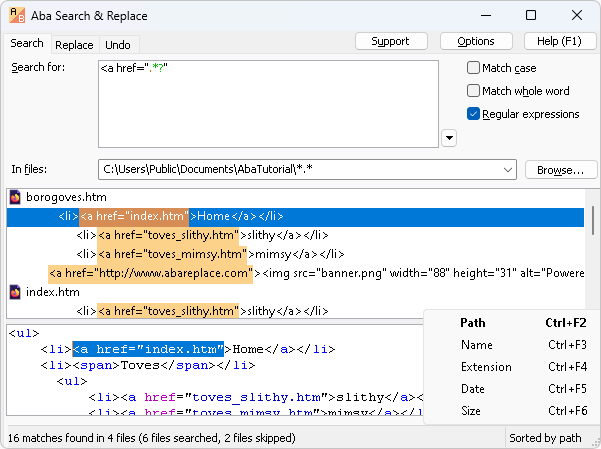
Replacing text in several files used to be a tedious and error-prone task. Aba Search and Replace solves the problem, allowing you to correct errors on your web pages, replace banners and copyright notices, change method names, and perform other text-processing tasks.
Features
- Incremental search: the results are displayed immediately as you are typing the text to search for.
- 📝 Multi-line search and replace.
- ⚙️ Regular expression support including lookaround, non-greedy matching, and other advanced features.
- Complex replacements including converting the matching text to lowercase, inserting the file name, or adding width/height attributes to
<img>tags. - Replace in Unicode files (UTF-8, UTF-16).
- Preview before replacement: other tools require confirmation for each replacement, while Aba shows the list of replacements in context. You can review the list and confirm the changes at once.
- Undo for any replacement.
- 🔖 Search history and favorites.
- Syntax highlight for regular expressions, HTML, CSS, JS, Python, PHP, and C/C++ files.
- 🔗 Integration with Windows Explorer, Total Commander, and Free Commander.
- Search and replace from command line.
- Context-sensitive help, references and tutorial included.
Usage examples
For web designers:
- changing headers, menus, meta tags, footers, copyright notices, and other repetitive elements of your web pages;
- adding registered trademark sign (®, ™) to every occurrence of your product name;
- cleaning the output of an automated conversion tool (for example, a PDF to HTML converter).
For programmers:
- inserting a header with the author name, copyrights, etc. to the beginning of each source code file;
- renaming a class, method, or function and even adding or removing method parameters.
News
January 28, 2024. Aba 2.6.2 is released. This is a bugfix release; fixed replacement sorting and non-blinking caret; added new menu items to copy the replacements; implemented wider tabs; excluded node_modules and some binary extensions.
January 28, 2024. Regular expressions 101.
December 30, 2023. Regular expression for numbers.
December 25, 2023. Aba 2.6. New features: complex replacements, a 64-bit version, and user interface improvements. German , Italian , French , and Spanish translations are available.
May 21, 2023. Search from the Windows command prompt.
April 10, 2023. Empty character class in JavaScript regexes.
January 28, 2023. Aba Search and Replace is certified for publication to the Microsoft Store.