Repetitions * + ?
With repetitions, you can find something repeating several times.
Star, plus, and question mark
The Kleene star * matches zero or more occurrences, + matches one or more occurrences, and ? matches zero or one occurrence:
=* |
Nothing or several equality signs |
.* |
The whole file |
.+ |
The whole file (excluding empty files) |
\w+ |
A word (several “word” characters) |
0?2 |
Either 2 or 02 |
0*2 |
Two with optional leading zeros (e.g., 2, 02, or 00002) |
The difference between * and + is that the former matches an empty string, and the latter does not. For example, if you search for the pattern "\d*", Aba may find the empty quotes "", while the search for "\d+" will not find them.
The question mark ? is useful for making some part of your regular expression optional (e.g., skip leading zeros or “www” before a URL).
Braces {n,m}
Braces are a generalized form of repetition. You can match something repeating from min to max times by using {min,max} syntax. If max is omitted, there is no upper bound: {min,} means something repeating at least min times.
If the comma is omitted, the previous element will be repeated exactly N times: {N}. It's equivalent to {N,N}.
\d{4} |
Exactly four digits |
\s{2,3} |
From two to three spaces or tabs |
[a-z]{2,} |
At least two Latin letters |
The star * is the same as {0,} and plus + is the same as {1,}.
If there is something else than the minimum and the maximum in braces, it will be interpreted literally. For example, {abc} matches this very text: “abc” in braces.
Minimizing repetitions
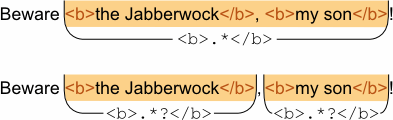
By default, the repetition operators are maximizing (greedy), that is, they capture as much repetitions as possible. Use *?, +?, ??, and {min,max}? for minimizing (non-greedy) matching.
For example, if you need to match the inner part of the <b> tag, <b>.*</b> would match until the last closing tag, which is undesirable. For the correct matching, use <b>.*?</b>:
Usage examples
If you need to repeat several characters, put them in parentheses (you can use a non-capturing group here):
(abc)+ |
“abc” repeated one or more times |
(?:[a-z][0-9]){3} |
Three alternating letters and digits, e.g. b7r5q0 |
Here are more complex examples:
\w+ \d+ |
A word followed by a number (e.g., step 11) |
https://[a-zA-Z0-9./_&=%?~#-]+ |
HTTPS links (will not match international characters) |
<a href="https?://[^"]+"> |
A link to external site (HTTP or HTTPS protocol) |
\<[0-9]{1,2}/[0-9]{1,2}/([0-9]{2})?[0-9]{2}\> |
Date in the US format: month/day/year. The month and the day are one or two digits; the year is two or four digits. |
#([0-9a-f]{3})?[0-9a-f]{3} |
Color in hex format (3 or 6 hex digits). |
https? means “http or https” (the letter “s” is optional).
The link examples show two possible approaches to using repetitions:
- match only the allowed characters (a-z, 0-9, etc. are allowed in URLs);
- match everything except forbidden characters (quote
"is forbidden in URLs).
When using the first approach, you need to specify the allowed characters. There may be a lot of them; for example, URLs may include not only English letters, but also the letters with diacritic marks, Cyrillic and Greek letters, Chinese ideographs, etc. If you don't include them, your regex will not work for international URLs.
When using the second approach, you sometimes have another problem: the regular expression may capture more characters than needed. You should choose one of these approaches depending on the kind of text that you are working with.
This is a page from Aba Search and Replace help file.
- Welcome to Aba
- Getting started
- How-to guides
- Selecting the files to search in
- Inserting some text at the beginning of each file
- Replacing multiple lines of text
- Searching in Unicode files
- Replacing in binary files
- Performing operations with the found files
- Undoing a replacement
- Saving search parameters for further use
- Removing private data
- Adding or removing Aba from Explorer context menu
- Integrating Aba with Total Commander
- Integrating Aba with Free Commander
- Integrating Aba with Directory Opus
- Regular Expressions
- Replacement syntax
- User interface
- Command line
- Troubleshooting
- Glossary
- Version history
- Credits