Selecting the files to search in
If the files are located in one folder, you can use the following methods:
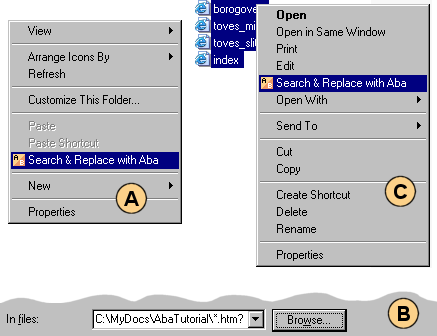
- Right-click the blank space in the Explorer window and choose Aba Search & Replace from the context menu (figure A). This method also works in other file managers (e.g., Total Commander).
- Run Aba, press the Browse button and navigate to the folder you want to search in (figure B). By default, Aba searches in subfolders, but you can uncheck Include subdirectories if you want a shallow search.
If you searched in this folder before, you can also select it from the drop-down list near the Browse button.
Sometimes you need to search only in a few files of the folder. In such case, you have two options:
- Select these files in Explorer, right-click them, and choose Aba Search & Replace from the menu (figure C).
- Use file masks. For example, enter
*.htm?to search in all.htmand.htmlfiles.
This is a page from Aba Search and Replace help file.
- Welcome to Aba
- Getting started
- How-to guides
- Selecting the files to search in
- Inserting some text at the beginning of each file
- Replacing multiple lines of text
- Searching in Unicode files
- Replacing in binary files
- Performing operations with the found files
- Undoing a replacement
- Saving search parameters for further use
- Removing private data
- Adding or removing Aba from Explorer context menu
- Integrating Aba with Total Commander
- Integrating Aba with Free Commander
- Integrating Aba with Directory Opus
- Regular Expressions
- Replacement syntax
- User interface
- Command line
- Troubleshooting
- Glossary
- Version history
- Credits